
Promoting Student Ownership with Checklists
- Lindsay Whaley
- Apr 15, 2022
- 3 min read

Week 2: Successful Centers with Checklists
I want to take time this week to share how I do centers with my upper-elementary students. Small group time is very important to me and I like to dedicate 30-45 minutes of our schedule to pulling groups in both math and reading. When I started teaching I struggled with what the rest of the class should be doing. I needed something that was going to give them time to practice their skills, but also something they could do independently so I could have uninterrupted small group time. In my 6 years of teaching, I have tried different routines almost every year, there are no shortage of resources out there for "centers" time. I have seen ideas like Daily 5 and Math Centers work great at all levels, especially younger grades. I noticed that upper-elementary students (3-5 grades), are more than ready to take more ownership of their learning.
Must-Dos, Can-Dos, and May-Dos

Last year I did a PDSA, Plan-Do-Study-Act (shout out David Langford!) to create a better option for centers. I was teaching virtually and needed a way to see how students were using their asynchronous time (asynchronous time is when students are not logged on to the class, but working independently).

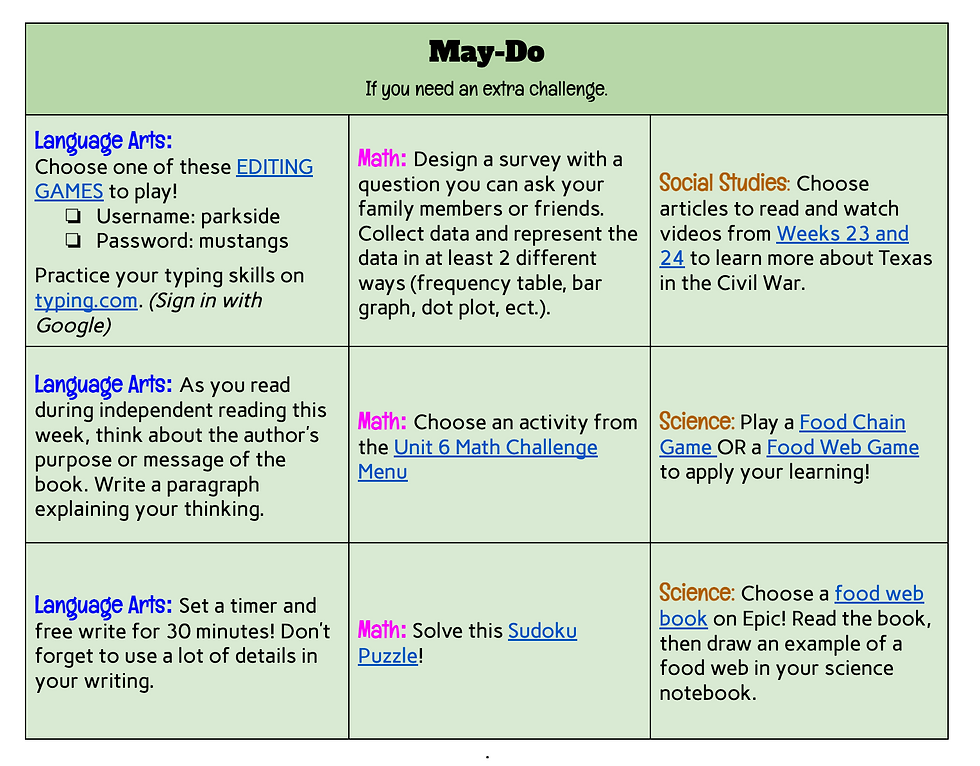
This is when I stumbled across the idea of Must-Dos, Can-Dos, and May-Dos. Must-Dos are determined by the teacher as required activities. Can-Dos and May-Dos are additional practice and challenge activities, respectively, that students can pick from (think choice boards). I created a checklist with Must-Dos on top, for students to complete first with their given asynchronous time. Once Must-Dos are complete, students can think about if they need extra help, practice, or challenge. They can work on Can-Dos for practice and May-Dos for challenge. Now that I am back with in-person students, I have found the checklist to still be successful.
Navigating the Checklists
I post the checklist onto Google Classroom to make a copy for each student. They are able to mark when they have completed activities as well as access links to activities. This helped me virtually, because I could log on at anytime to check and see what students had completed for the week and they had the entire week's of activities all at once, so I didn't have to do extra work each day getting activities or centers ready. In-person I have found printing the checklists beneficial for students so they can physically write on the checklist and staple any work to the checklist as the week goes on. I still post a link to a digital checklist on Google Classroom so students can access needed links for digital activities.
After starting the checklists with my class, I noticed that many students loved the ability to choose their activities and prioritize what they wanted to do first. Some chose to do their preferred activities first while others chose to get their least preferred activities done first so they can spend the rest of the week on what they like best. On the other hand, having this kind of independence was a struggle for some students, especially at the start. There are a lot of activities to complete and choose from, and this can be overwhelming for students. I created a flow-chart (see below) to help those who needed more structure decide what they should work on.

This chart is posted on Google Classroom along with the checklist each week, so students can always have easy access. Students who use the chart, are easily able to follow it and understand what they would work on. To keep accountability up, on Fridays we have free time as a class, students can only participate in free time if their Must-Dos are all complete.
Student Ownership brings joy.
I have been using this checklist system for a year and a half now and my students love it. They often ask me when they get to work on their checklists. They enjoy the feeling of ownership of their time and learning. They also love being able to check things off their list, they feel accomplished and proud when they finish what they need to. If you'd like to give the checklist a try with your class, I have posted the checklist template and flow-chart on my TpT store.
If you do use this with your class, I'd love to hear from you! Feel free to leave a review on TpT or email me at whaleysweekly@gmail.com.
Comments